Compatible laptop RAM starts with the exact machine, not the capacity printed on a memory listing. First establish whether the laptop has replaceable memory. Then confirm the required generation, module format, supported capacity, and operating conditions.
For repair channels, upgrade providers, and distributors, these checks should produce a configuration record that can be reused when ordering. A general request for “RAM for laptop upgrades” leaves too much room for different machines and incompatible parts to be grouped together.
Record the manufacturer, complete model, product or machine-type code, and processor. A product family can include variants with different memory layouts. Do not approve an upgrade using only a series name, screen size, or processor badge.
Open the manufacturer's specification page and service or maintenance manual for that variant. Look for the memory type, installed arrangement, expansion slots, supported configurations, and memory replacement procedure. Keep the document link with the machine record.
Dell's laptop memory installation guidance directs buyers to check upgradeability and the service manual before installation. Treat a general upgrade guide as orientation; the model-specific manual determines the actual service procedure.
| Documented memory layout | What the buyer should do |
|---|---|
| All memory soldered, with no supported expansion connector | Do not order a plug-in module as an ordinary upgrade. Reassess the service requirement or system choice. |
| Soldered memory plus a removable module slot | Record onboard capacity separately and confirm the permitted expansion module and total capacity. |
| One or more SO-DIMM slots | Check occupied slots, accessible slots, per-slot limits, and the supported installed arrangement. |
| Another replaceable format, such as CAMM2 or LPCAMM2 | Follow that format's system-specific requirements. A SO-DIMM is not a substitute. |
| Layout unclear or documents conflict | Hold the configuration for technical review instead of guessing from the retailer's listing. |
Some onboard memory does not necessarily prevent expansion if a supported slot is also present. Conversely, a laptop advertising DDR5 memory does not necessarily have a DDR5 SO-DIMM slot. Identify both the fixed memory and the expansion interface.
LPDDR labels commonly appear on systems with soldered memory, but the technology name alone is not a complete description of the mounting arrangement. Check the exact design, particularly where a replaceable low-power format is documented. Acer's soldered and socketed memory explanation provides background on these upgrade paths.
System information and diagnostic utilities can help record installed capacity and memory identifiers. Use their slot reports as supporting evidence, not a replacement for the service documentation. A software screenshot does not show whether a connector is physically accessible or which replacement configurations the manufacturer supports.
Once an upgrade path exists, translate the machine's requirements into a module specification. “Laptop memory” describes the application, not a universal interchangeable part.
Match the DDR generation stated for the exact machine. DDR3-family, DDR4, and DDR5 modules should not be treated as substitutes. Match the required mechanical format as well: a full-size desktop module does not replace a notebook SO-DIMM simply because capacity and speed look similar.
For a DDR4 request that mixes notebook and desktop stock, the DDR4 SO-DIMM versus UDIMM guide explains the form-factor distinction. Keep detailed generation-specific selection in the relevant guide rather than applying one module rule to every laptop.
Confirm any voltage, electrical-class, or organization requirements from the manufacturer and proposed module datasheet. Do not assume a workstation needs the same memory class as an ordinary office notebook, or infer ECC support from a generic product label.
Record the target system total, capacity per removable module, number of modules, and retained onboard memory. A 32GB target could involve one 32GB module, two 16GB modules, or a supported combination with onboard memory. Those arrangements have different requirements.
A maximum total-capacity statement does not establish the maximum capacity of each slot. Check the supported arrangement rather than dividing the total by the number of slots or assuming that one large module is acceptable.
A module's advertised data rate does not promise that every compatible laptop will run at that rate. The processor, firmware, supported settings, and installed arrangement affect the result. Ask for the expected operating setting on the target machine, especially when a quotation offers a faster-rated substitute.
For mixed installations, record what will remain in the system. Matching capacity and speed labels alone does not establish that two independently selected modules are a qualified pair. Validate the intended combination when retaining existing memory is part of the service plan.

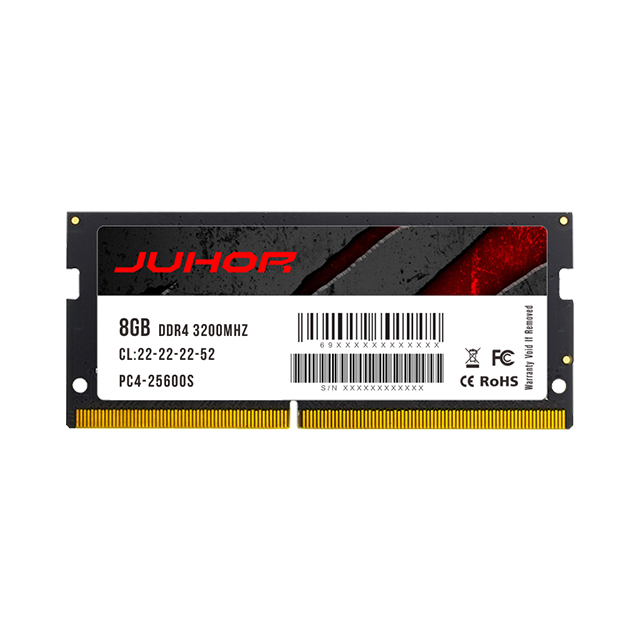
Official JUHOR website illustration showing a module labeled 16GB DDR5 and a compact slot arrangement. Use the image to recognize label fields and physical format, not as a specification sheet, compatibility approval, or confirmation that a pictured configuration is available.
A distributor may hold several modules with the same capacity while serving laptops that need different generations or formats. Keep those stock lines distinct. Within a generation, a supplier's series name may still cover different part numbers or revisions.
Build an internal mapping between laptop variants and reviewed memory configurations. Useful fields include the host identifier, document source, BIOS, original memory, proposed module identity, installed layout, target setting, and review status. This is a recommended stock-control practice, not a claim that a supplier already maintains such a database.
Separate unreviewed requests from configurations supported by documents and those validated on a representative machine.
Keep the supplier's part number and revision with the quotation, sample record, and approved stock line.
Record whether the service action adds a module, replaces one module, or replaces the complete removable set.
Assess a proposed module revision or host BIOS change before extending an earlier approval to new deliveries.
Do not turn one successful upgrade into a blanket approval for a whole laptop brand. Group machines only where the documented platform and relevant configuration are equivalent.
Keep module-label photographs and source documents together. When using JUHOR's technical-document download page, check that a file describes the exact proposed generation, format, and part number. A desktop datasheet or a document for another product does not validate a notebook replacement.
Prepare one row per distinct laptop configuration. If a detail is unknown, mark it as pending rather than filling it with an assumption. That makes the unresolved compatibility question visible before a price is treated as an orderable specification.
| Information to send | What to include | Purpose |
|---|---|---|
| Laptop identity | Brand, complete model, product or machine-type code, processor | Find the correct platform documents |
| Current configuration | Installed total, onboard capacity, occupied slots, full module-label photos | Establish what is retained or replaced |
| Supported upgrade path | Service-manual link, connector format, supported generation and capacity arrangement | Rule out an unsuitable plug-in module |
| Target configuration | Total capacity, capacity per module, module count, add-or-replace plan | Define the actual product requirement |
| Operating requirement | BIOS version, required running rate, applicable default settings, special electrical requirements | Separate nominal ratings from required operation |
| Quantity | Number of machines and number of modules or kits per configuration | Avoid confusing laptop count with module count |
| Supporting evidence | Proposed part number, datasheet, relevant compatibility evidence, unresolved questions | Review the quotation against a defined configuration |
| Optional project details | Delivery destination and window, packaging needs, requested sample plan | Request commercial confirmation without assuming included services or terms |
For example: “Twelve laptops of the attached exact model, each currently using two removable 8GB modules; target 32GB total per system; replace both modules. Please confirm supported replacement specifications, the required number of modules, and current availability before quoting.” This illustrates an inquiry format, not a promise that any particular machine accepts that upgrade.
Avoid posting service tags, serial numbers, or user information in public article comments. Share only the necessary identifiers through the intended private support or sales channel.
Where sample validation is needed, agree on the acceptance conditions for the actual laptop variants. Record detected capacity, running settings, startup and resume behavior, and the results of agreed memory diagnostics and representative applications. One successful boot does not replace that record.
For a JUHOR inquiry, send the model list, current configuration, target arrangement, and quantities using the laptop memory category as the product-line starting point. Request a specification review and a quotation for configurations confirmed as available. The existence of a category or an educational article does not establish supply of every capacity, generation, or speed combination.
The order should identify a proposed module, a supported host arrangement, and any remaining validation work. Resolve those fields before repeating the purchase across a fleet.
Identify the exact model and read its official memory specifications and service manual. Then match the upgrade interface, generation, capacity arrangement, and operating requirements to the proposed module.
No. A machine with only soldered memory and no supported expansion connector has no ordinary plug-in upgrade path. Other designs may provide removable memory or a slot alongside onboard memory.
No. Confirm the physical connector, accessibility, and supported configurations in the model-specific documentation. Investigate conflicting reports before ordering.
Only after confirming a compatible operating setting and the full module specification for that host. A higher label alone does not prove a valid replacement or guarantee a speed increase.
Not necessarily. It may describe one module or the system or kit total. State capacity per module, module count, and target installed total separately.
Send the exact laptop model, current memory details or labels, desired configuration, and quantity. Add the service documentation and BIOS information when available, and identify any fields still awaiting confirmation.


4 / F, No. 18, Langkou Industrial Park, Langkou Community, Dalang Street,Shenzhen,Guangodng , China